How to Charge a Non-Tesla EV (Ford, GM, Rivian) at a Tesla Supercharger
Hi there, it’s Alex Reynolds. If you’ve been following along, we just covered the essentials of J1772 adapters for home charging. But today, we’re moving from the comfort of your garage to the open road. I get asked this question daily: “Alex, now that Tesla has opened up their network, can I just pull up to any Supercharger with my non-Tesla EV and plug in?”
The short answer is: Yes, but it isn’t as simple as just “plug and play” like it is for a Tesla owner.
In 2026, the charging landscape is vastly improved, but there are still nuances regarding equipment, software, and physical compatibility that every EV owner needs to understand to avoid frustration—or worse, damaging your vehicle’s charging inlet. Let’s break down how to safely and effectively use a Tesla Supercharger for your non-Tesla vehicle.
The Most Critical Distinction: AC vs. DC Adapters
Before we even talk about plugging in, I need to issue a Technician’s Safety Warning. In our previous guide, we discussed the J1772 to NACS adapter (used for AC home/destination charging). Do not attempt to use that AC adapter at a DC Supercharger.
- AC Charging (Level 1/2): Uses the J1772-to-NACS adapter. Designed for lower power delivery.
- DC Fast Charging (Supercharger): Requires a specialized CCS to NACS (DC) adapter. These are heavier, robust, and designed to handle the high-voltage direct current (DC) that the Supercharger pumps out.
Using the wrong adapter at a high-voltage station can lead to catastrophic failure of your vehicle’s On-Board Charger (OBC) or the charging port itself. Always check your manual to see if your manufacturer provides a specific DC adapter or recommends a certified third-party solution.
Step-by-Step: How to Charge a Non-Tesla EV at a Supercharger
If your vehicle is compatible (and most modern Ford, GM, Rivian, and Hyundai models now are), follow these steps to ensure a smooth, safe charging session.
1. Plan Your Route
Don’t just drive to the nearest Supercharger. Use your vehicle’s built-in navigation or the Tesla app to find stations labeled as “Open to NACS-equipped EVs” or “Non-Tesla compatible.” This ensures you aren’t arriving at a station that only supports legacy Tesla vehicles without the hardware to communicate with your car.
2. Download and Set Up the Tesla App
Even if you own a Ford or Rivian, the Tesla app is your master key for these stations.
- Download the Tesla App and create an account.
- Add your vehicle and payment method.
- Select “Charge Your Non-Tesla” within the app menu. This is critical for the station to recognize your car and bill you correctly.
3. The Physical Connection
Once you’ve selected the station in the app:
- Park in the correct stall. Note that Supercharger cables are shorter than typical public chargers. You might need to pull closer to the charger than you’re used to.
- Grab the cable (and your DC adapter if required by your vehicle).
- Plug the adapter into the Supercharger cable first, then insert the assembly into your vehicle.
- Technician’s Tip: Listen for the “click” and wait for your vehicle’s charging light to transition from white/blue to flashing green (or whatever your specific vehicle’s “charging” color is).
4. Initiating the Charge
The Tesla app will communicate with the station. Once you press “Start Charging” in the app, the station will begin the handshake process. If the charging doesn’t start within 60 seconds, check your app—it may have timed out.
Why “Membership” Matters for Your Wallet
One thing many new users miss is the Supercharging Membership. If you are a frequent traveler, you can sign up for a monthly membership in the Tesla app. This typically gives you lower per-kWh rates. For the occasional road-tripper, pay-per-use is fine, but for frequent chargers, the math works out in your favor to subscribe.
Safety First: What to Watch For
As an expert in vehicle electronics, I watch for these red flags every time I test a charging station:
- Damaged Cables: Before you plug in, look at the cable insulation. If you see deep cuts, fraying, or exposed wires, do not use that stall. Report it through the Tesla app immediately.
- Station “Idle” Fees: Remember that Tesla Superchargers charge hefty idle fees if you leave your car plugged in after it hits 100% (or your set limit). Unlike home charging, these stations are for charging, not parking.
- Heat Sensitivity: If the adapter feels excessively hot—hot enough that you cannot comfortably hold it—stop the session and unplug.
Recommendation: Keep Your Gear Organized
Because you are now carrying an adapter (or two) in your trunk, keep them in a hard-shell, heat-resistant case. Tossing a high-voltage adapter into a pile of gym bags or loose grocery items is a recipe for bent pins.
If you are looking for a reliable, technician-vetted solution for your NACS/DC transition, check out our recommended heavy-duty adapters that meet UL 2252 standards.
👉 CLICK HERE TO CHECK LATEST PRICE ON AMAZON
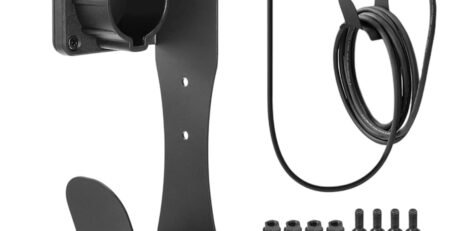
We also offer specialized storage mounts in our shop that help keep your charging cables protected from the garage floor, which, as I’ve preached before, is the #1 way to extend the life of your equipment.
Conclusion: You’re Ready for the Road
Charging your non-Tesla at a Supercharger is a game-changer for long-distance travel. By following the correct software setup and ensuring you are using the correct DC Fast-Charging adapter, you can access the most reliable charging network in North America with confidence.
Don’t let the complexity stop you—it’s just a matter of habit. Once you do it twice, it becomes as simple as filling up a gas tank, just cleaner and quieter.
👉 CLICK HERE TO CHECK LATEST PRICE ON AMAZON
For more guides on your specific vehicle and how to optimize your charging times, check out our Ultimate EV Charging Guide 2026 on the site.
Safe driving and happy charging!